
The message nobody answered is the one that costs you the review.
Every operator has the same failure mode. A guest asks something on a Saturday, it gets three emoji and no reply, and you find out about it in the review. Sherp watches your Slack for exactly that — the things somebody asked that nobody answered — and puts them in front of a manager before they turn into a problem.
It also answers. Ask it anything about your workspace history and it searches years of messages, threads, and screenshots, then writes back in plain English with links to the messages it read.

Nothing about this is a Slack problem. It's that your team's follow-through lives in a room where things scroll away, and the cost of a dropped thread is never the thread — it's a one-star review, an owner who stops trusting the reports, or a vendor quote that expires while everyone assumes someone else has it.
SherpWatch
Nothing asked of your team gets dropped.
SherpWatch reads the channels it's invited into and your shared inbox, and finds the things somebody asked that nobody answered. It posts a standing list at times you set, and pings once when an item goes past its deadline. React with a checkmark on the original message and it clears.
- A standing list of what's actually open — sized to work through, not a firehose
- Channels, thresholds, destinations and schedules are all edited in the Sherpa app, not by a developer
- Manager-facing by design — it protects your team's follow-through, it doesn't surveil it
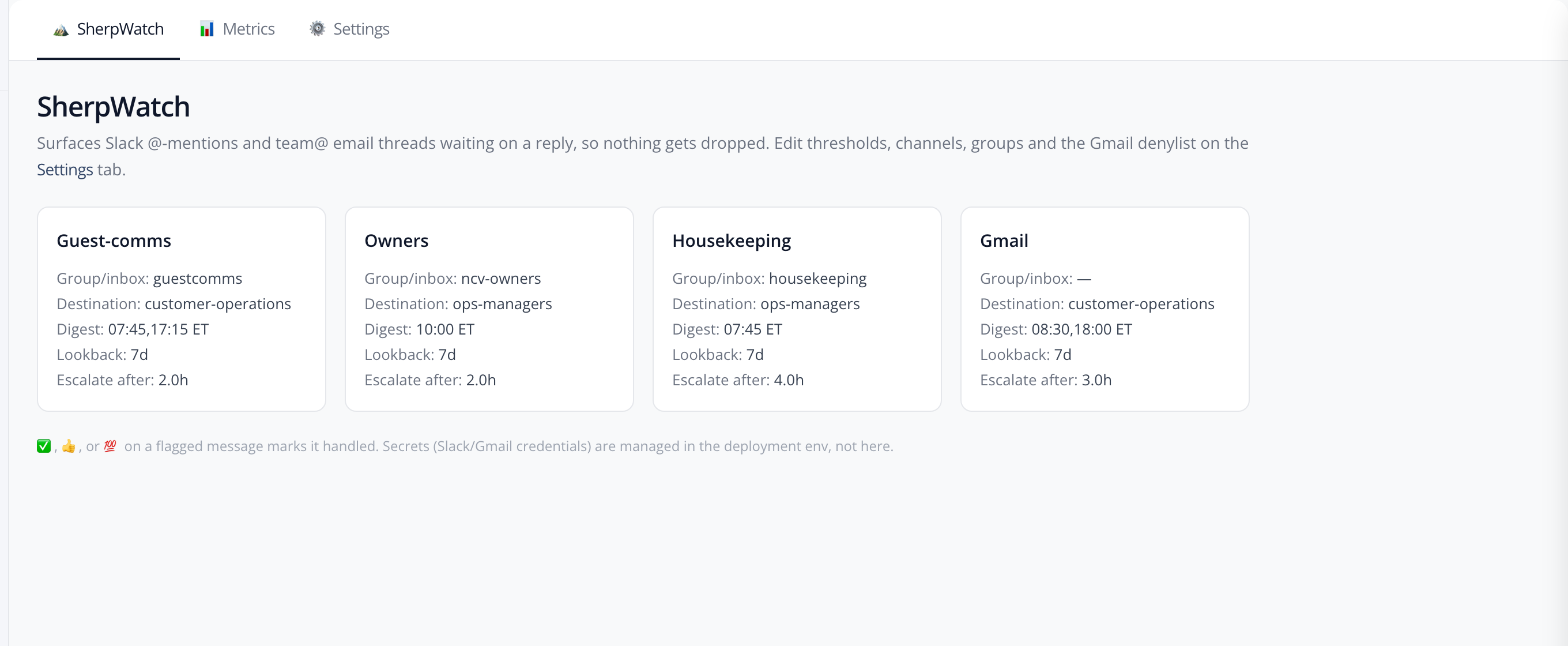
- Guest comms
- Anything tagging the guest team with no reply after it. Digest twice daily; escalates at two hours.
- Owners
- Owner tagged, no owner reply. Somebody else answering doesn't clear it. Sent to each owner privately.
- Housekeeping
- The same accountability rule for the cleaning crews, in their own channels.
- Bookkeeping
- Its own digest and escalation track.
- Anything else
- A classifier reads every unanswered thread, tagged or not, and surfaces only what it judges to be a real open task.
- Shared inbox
- Email threads where the last message came from outside and nobody replied. Replying, forwarding, or archiving clears it.
An owner request isn't closed because a coordinator replied — SherpWatch knows which reply it was waiting for, and keeps the item open until the right person answers it.
Sherp
Ask your Slack anything, without leaving Slack.
Slack search hands you a list of messages and leaves the reading to you. Sherp turns the question into several targeted searches, reads what comes back — thread replies and shared photos included — and writes the answer, with numbered citations back to the originals.
/sherp what did we decide about the hot tub at Harborview 2B?
You decided to keep the hot tub listed but close it from December through February rather than remove it. The cover replacement quote came in at roughly nine hundred dollars against about four hundred a month in winter servicing, so seasonal closure won on cost. [1] [2] The listing copy and the house manual were both updated to say the tub is closed for the winter, so guests see it before booking rather than at check-in. [3]
One caveat: the decision was made for that unit only. The Lakeside tub stays open year round, because its equipment is enclosed. [2]
Sources
- [1] @dana in #maintenance · Nov 12
- [2] @miguel in #ops · Nov 12
- [3] @dana in #listings · Nov 14
Illustrative example. Real answers cite real messages in your own workspace — the properties, people, and figures here are invented.
More questions it gets asked. Open one to read the answer.
-
You ask
Type /sherp [your question] in any channel or DM. Plain English — no search operators, no keywords to get right.
-
Sherp searches smart
Sherp turns your question into multiple targeted Slack searches, pulls in thread replies, and reads any shared images or screenshots.
-
You get an answer
A plain-English reply with inline citations linking straight to the source messages. Click through to verify anything.
- Reach
- All of it. Every channel the person asking already belongs to, back to the beginning — not a window of recent messages.
- Controls
- Scope a question to one channel, limit it to a date range, or press Dig deeper for a slower, more thorough search.
- Gets smarter
- Rate an answer and say what was missing. Those notes feed later searches, so it picks up your properties, your people, and your shorthand.
- Cost to your team
- No Slack plan upgrade, and no per-person AI subscription for anyone who wants to use it.
Where each one lands
There's already AI in your Slack. Here's what it does and doesn't do.
Mentioning Claude in a Slack channel, connecting Claude to Slack, and turning on Slack's own AI are three different products with three different limits. None of them is trying to do the operations half.
Scroll the table sideways →
| Question | Sherp + SherpWatch | Claude in Slack | Claude's Slack connector | Slack AI |
|---|---|---|---|---|
| Answering questions | ||||
| Can it answer from years of history? | Yes. Full search, every answer cited | No. The last 20 messages in a channel, 50 in a thread 1 | Yes. Searches channels, DMs and files 2 | Yes. Search answers |
| Do you stay in Slack to get it? | Yes. Answer lands in the channel you asked in | Yes. | No. You ask from inside Claude 2 | Yes. |
| What does each person have to buy? | Yes. Nothing extra | No. Their own paid Claude account 1 | No. Their own paid Claude account 2 | No. A workspace-wide plan upgrade |
| Does it learn your properties and shorthand? | Yes. From your team's own corrections | Partly. General assistant | Partly. General assistant | Partly. General search |
| Following through | ||||
| Does it chase what nobody answered? | Yes. Digests and escalations | No. Not what it's built for | No. Not what it's built for | No. Not what it's built for |
| Does it know when the right person replied? | Yes. Owner and crew accountability | No. Not what it's built for | No. Not what it's built for | No. Not what it's built for |
| Does it watch the shared inbox too? | Yes. Unanswered email threads, same list | No. Not what it's built for | No. Not what it's built for | No. Not what it's built for |
The top half is a real contest — the others answer questions, and two of them answer from full history. The bottom half is the part nobody else is aiming at, and it's the half that costs you a review when it's missing.
Built-in guardrails
Private to your team. Grounded. Not here to guess.
Per-user permissions
Everyone connects their own account once, and Sherp searches as them. It can never surface a channel they aren't already in.
Cited or silent
Sherp won't fabricate. If the messages don't support an answer, it says so.
Ephemeral by default
Answers are visible only to you unless you choose to share them with the channel.
Corrections stick
Thumbs-down on a bad flag teaches SherpWatch where your team's bar actually is, and its accuracy is tracked on a metrics page you can see.
Speaks your team's language.
Ask in Spanish, get an answer in Spanish. Ask in French, get it in French. Sherp handles 100+ languages out of the box — so a mixed Slack workspace doesn't mean a mixed experience.
Getting it running
One admin, one approval, one command each.
A Slack admin adds it to your workspace, we approve the workspace on our side, and everyone else connects their own account with a single command the first time they use it. Nobody's IT project. Nobody's migration.
It fits operations-heavy teams where Slack is where the work actually happens — property management first, but the same shape holds for customer ops, field services, and client-facing agencies. If your team keeps re-asking questions that were already answered, and things occasionally go quiet that shouldn't, this closes both loops.
Beta — limited spots
Join the Sherp beta.
Slack-native, so there's nothing to migrate. No Slack upgrade and no per-person AI subscription for your team. Drop your email and tell us what keeps getting dropped — we'll reach out when there's a spot open.