
The direct booking site your PMS should have given you.
Every PMS ships a booking page. None of them ships a website: the one a guest finds, trusts, and comes back to. Sherpa Sites builds that site from the data already in your PMS: every home with its photos in your order, a price on every open night, exact totals, your verified reviews, and an Owners door with a revenue calculator. Reserve hands the guest to your PMS checkout only at the moment of booking.
Pick a layout and a type set, make it yours inside Sherpa, and go live on your domain. RatePulse, SherpaProof and SherpaFunnel come with it. The first 30 days are free.
Screens are from the live demo, built from the PMS of a real 76-home beach portfolio and its live calendar, the same way yours would be.
A brand that exists only on listing sites pays for every reunion with a guest who already loves the place. The usual fix is a template site from the PMS that nobody visits twice, or an agency build that costs thousands and then quietly rots. The site needs to be as current as the calendar and as trustworthy as the reviews, or it is a brochure.
What you get
Everything a real website needs. None of the building.
You do not design it, host it, update it or fill it in. You connect your PMS, choose a look, and write when you feel like it.
-
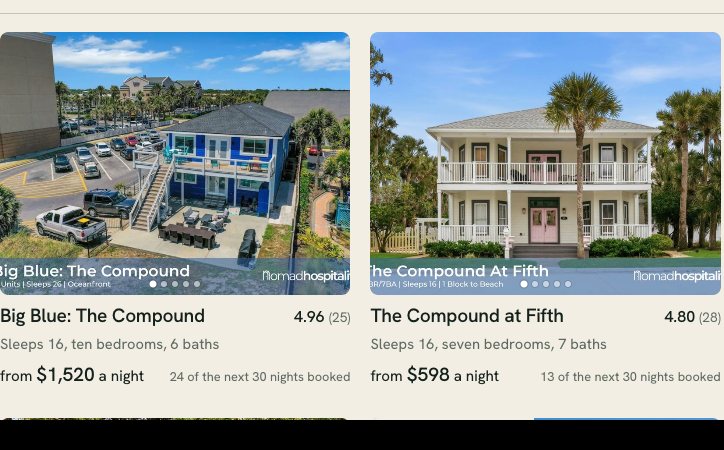
Your homes are already on it
Photos, descriptions, amenities, prices and open nights come straight from your PMS. Change something there and the site changes itself. Nothing to type twice.
-
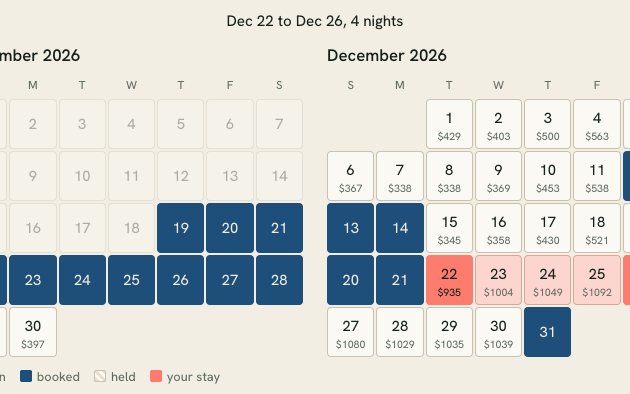
Real prices on real open nights
Guests see what each night costs and which nights are free, straight from your calendar. The total shows cleaning and tax before anyone clicks Reserve. No surprises, no emails asking 'is it available?'
-
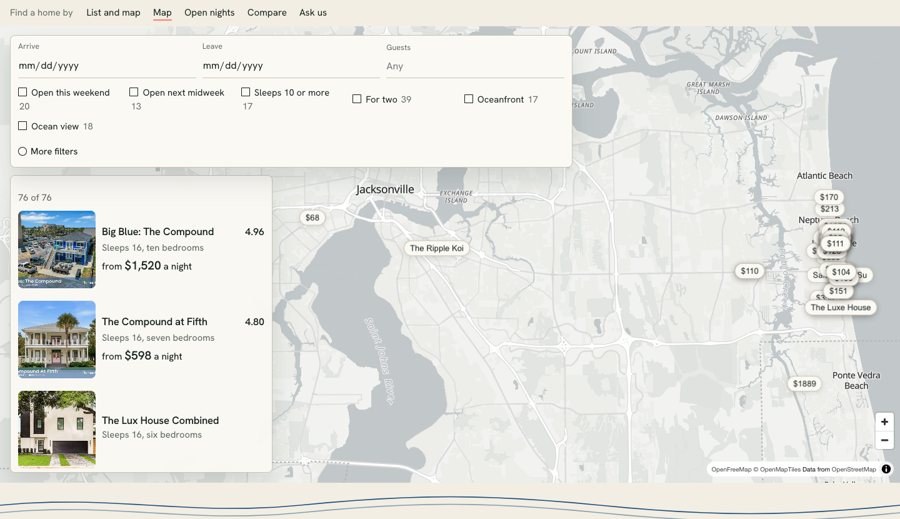
Guests can actually find the right home
Search by map, by open nights, side by side, or by answering three questions. Filters for bedrooms, price, pets and pool on every page. Your reviews from Airbnb, Vrbo and Google sit right there, marked verified.
Reviews by SherpaProof, included -
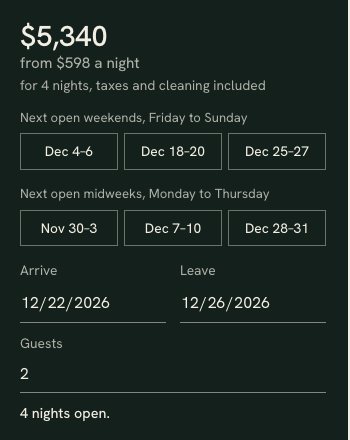
Booking stays exactly where it is
The Reserve button sends the guest to your PMS checkout with the dates already filled in. Payment, confirmation and the guest record never move. Right under it, guests see what the same stay costs on Airbnb and Vrbo.
Price check by RatePulse, included -
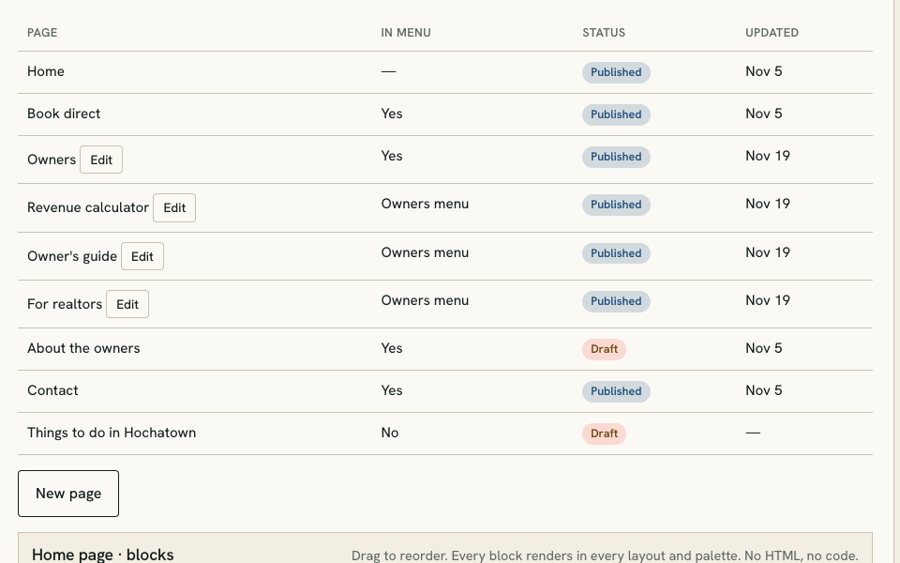
Edit it like a document, not a website
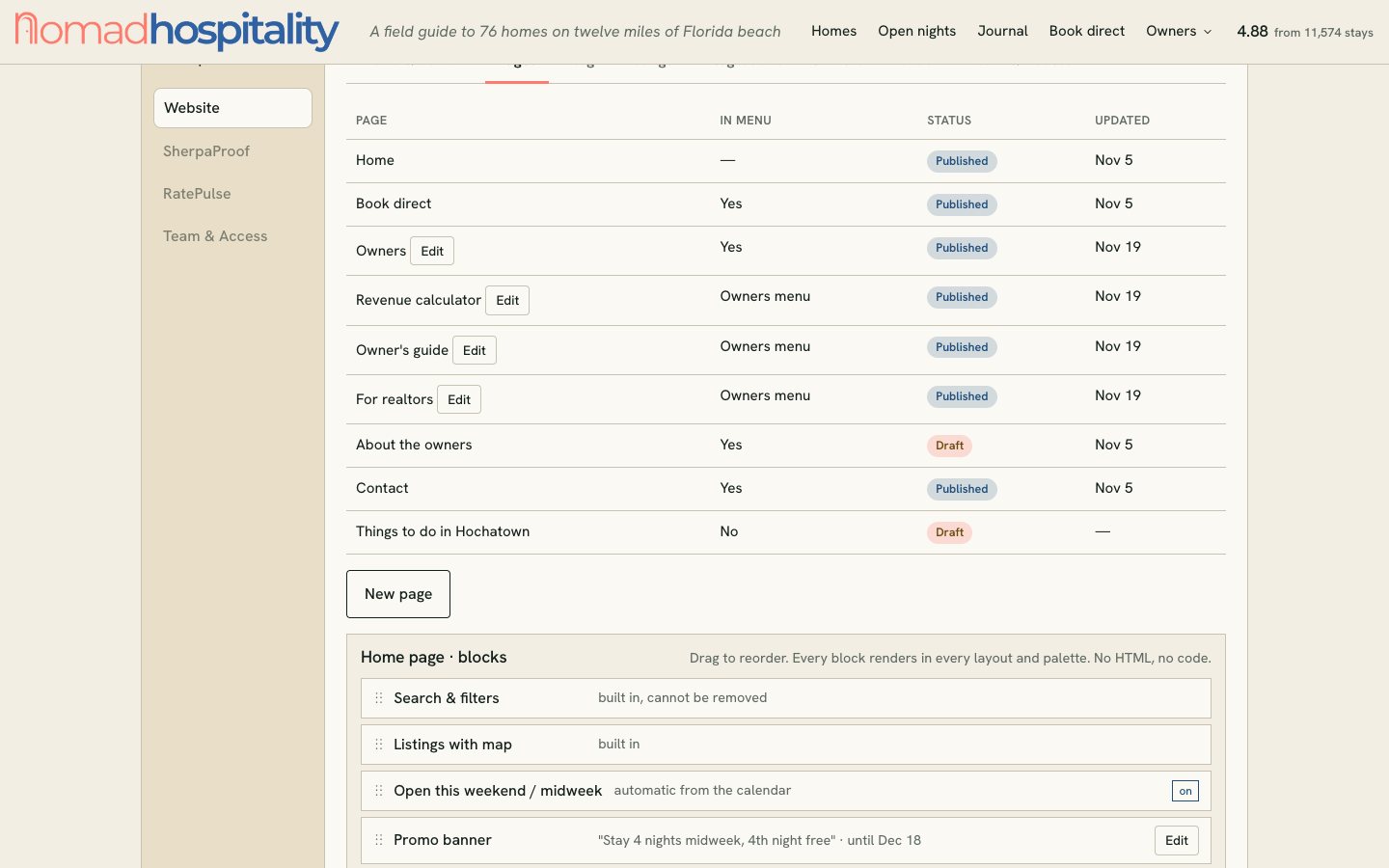
Pages are blocks you drag into order or switch off. Write a post, change the look, pick new colors. No designer, no plugins, nothing to install. Every visit, search, Reserve click and lead shows up in SherpaFunnel.
Site activity in SherpaFunnel, included -
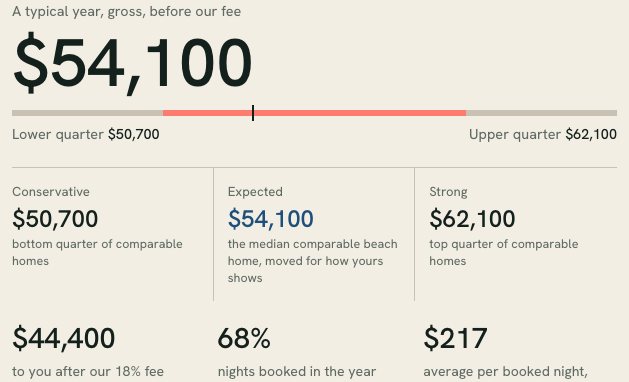
Win new owners from the same site
A page for property owners, with a calculator that estimates what a home could earn using your real booking history. When an owner fills in the form, it lands in your inbox and your CRM as a lead. There is a page for realtors who refer owners, too.
Leads tracked in SherpaFunnel, included
How it starts
Connect, preview, choose, go live. Then 30 days on us.
- 1
Connect your PMS
Uplisting or OwnerRez today. Sherpa reads your homes, photos in your order, the live calendar with nightly rates and stay rules, your fees and your reviews. Nothing to re-enter.
- 2
See your own site first
We render a preview from your data: every home, every open night priced, your reviews on the page. You judge it on your portfolio, not on a template with sample photos.
- 3
Make it yours
Pick a layout and a type set, light or dark. Edit pages as blocks, write the journal, switch the Owners door on, inside Sherpa. No theme files, no plugins.
- 4
Go live, free for 30 days
On a free subdomain or your own domain, with no card to start. The site rebuilds itself as your calendar changes. Payment never touches it.
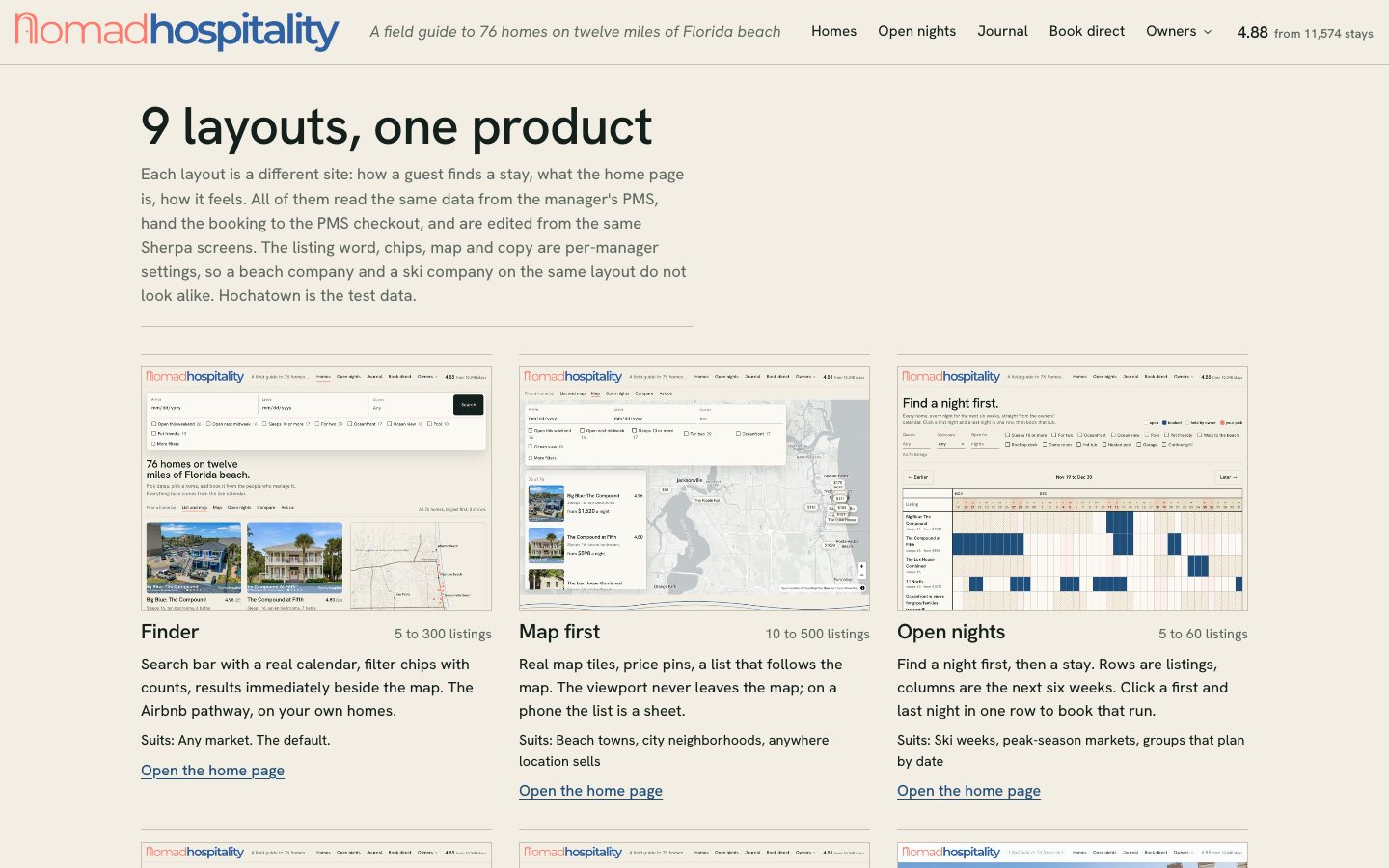
Nine layouts
Same listings, same calendar, a different way to find a stay.
A layout is a decision about how guests search, not a color scheme. Pick one to see it on the demo portfolio. Type sets, colors and your logo go on top of any of them.
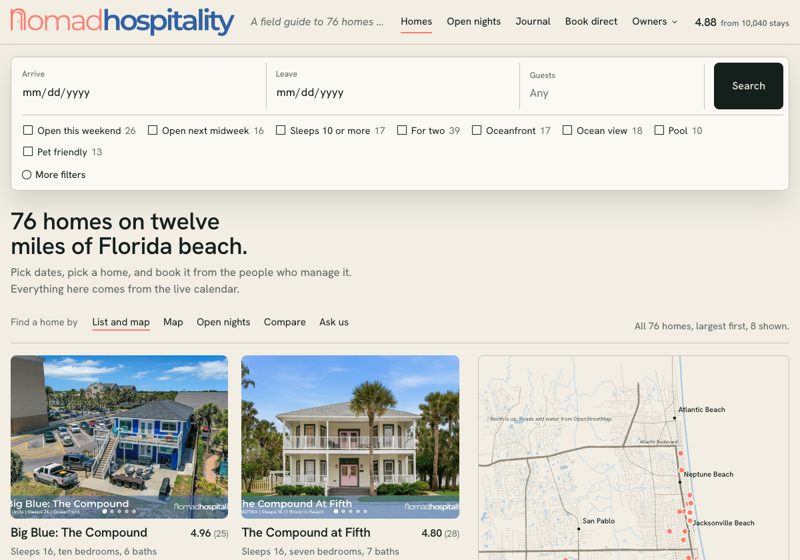
Finder
Any market · 5 to 300 listingsSearch bar with a real calendar, filter chips with counts, results beside the map. The Airbnb pathway, on your own homes.
How it works
Built from the PMS. Run from Sherpa. Owned by you.
On every listing page
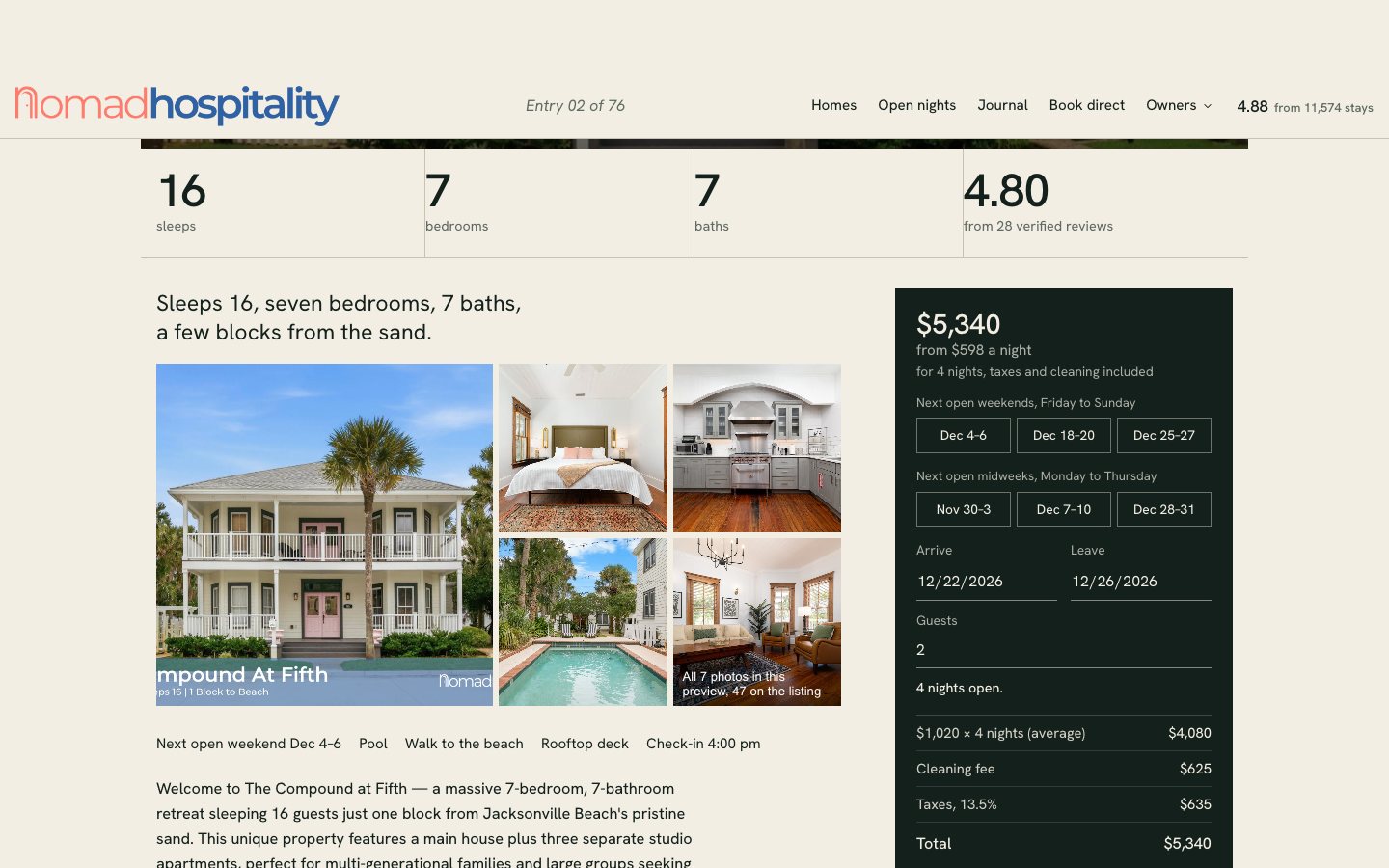
Every open night priced. Every total exact. Checkout only when they book.
The listing page is built from your PMS calendar, not a copy of it. Nightly rates sit in the calendar, minimum stays apply as the guest clicks, and the booking panel shows the whole bill: nights, cleaning, the fees your PMS charges, tax, total. Below it, RatePulse prices the same nights direct against Airbnb and Vrbo, live. Reserve opens your PMS checkout with the dates and guests already filled in. The guest never leaves your site until the moment of booking.
- Breakdown matches the PMS quote to the dollar (checked against OwnerRez and Uplisting)
- One calendar: the price check reads the dates from it, no second picker
- Each home's own reviews on its page, with the SherpaProof mark
Guests choose how to search
By list and map, map first, open nights, side by side, or by asking.
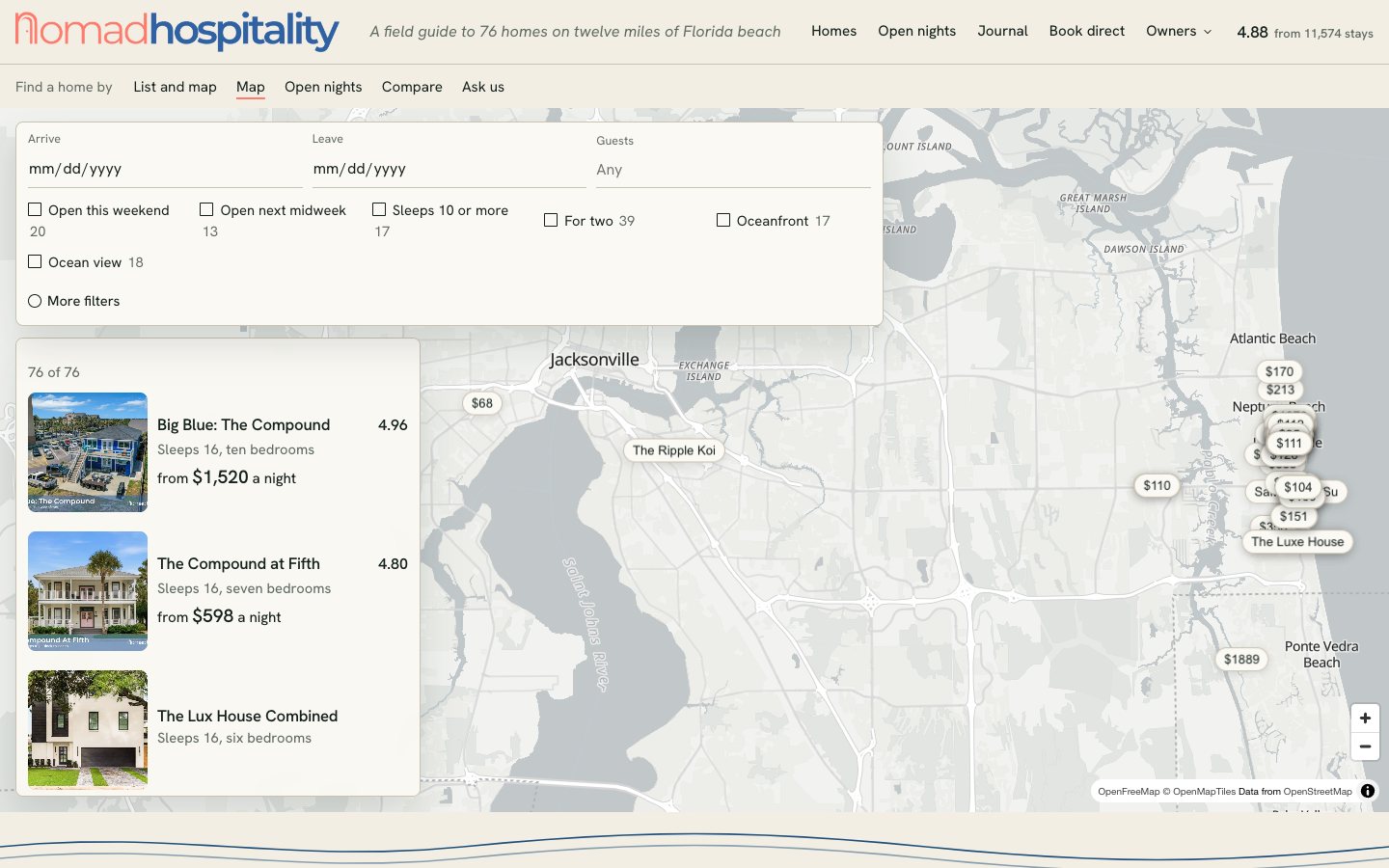
Nine home pages on one engine, each a different idea of how a guest finds a home. Every one filters by dates, guests, bedrooms, price a night, pets, pool and the rest of your amenities. Cards carry a photo carousel with your cover first. The date-driven guest and the group organizer get different pages on the same site, same calendar, same booking.
- A real tile map with price pins; the list follows the map
- An open-nights board a guest can book from directly
- Switch layouts from Sherpa without losing a page or a post
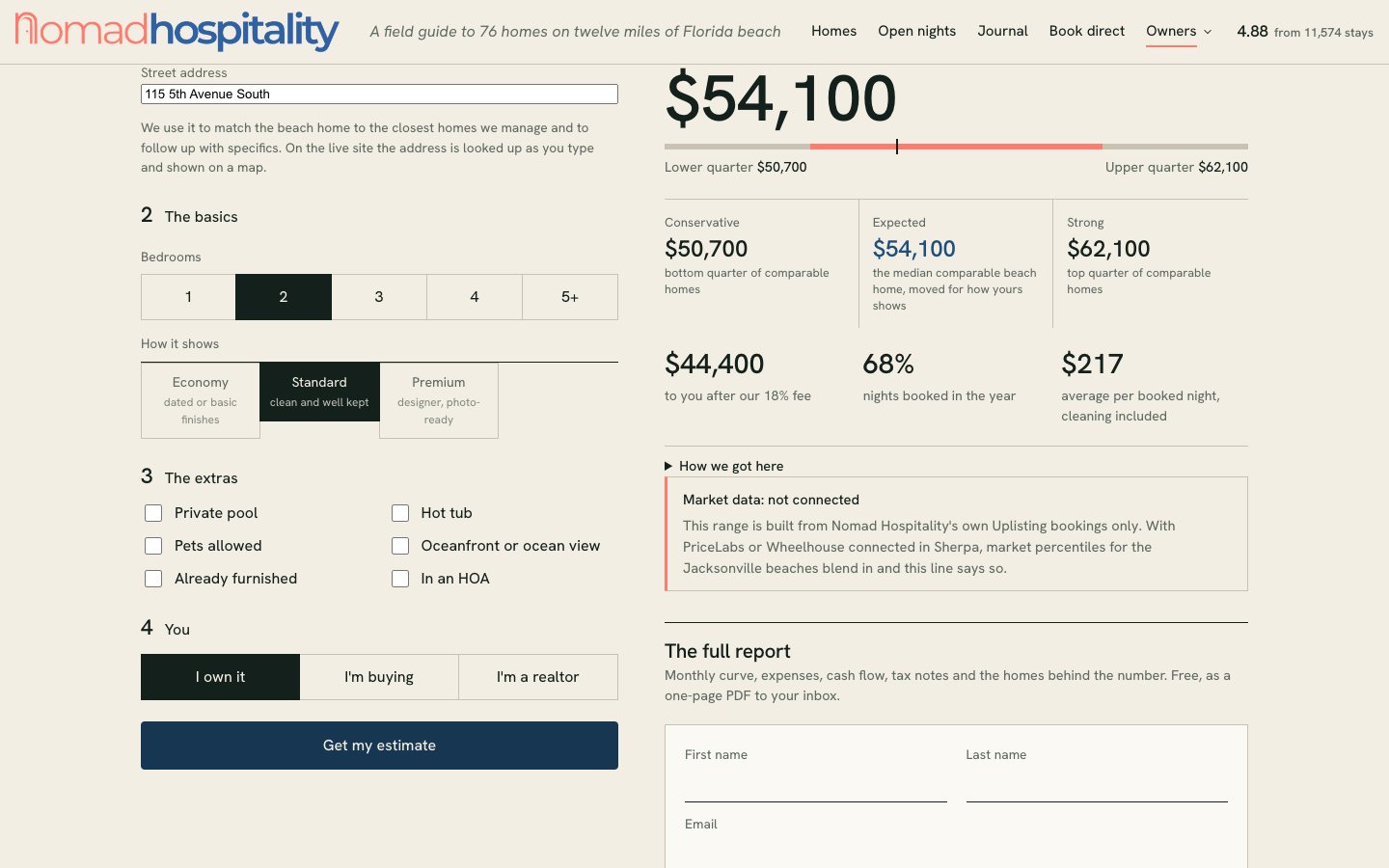
Owners come through the same door
A revenue calculator that shows its work, and sends you the lead.
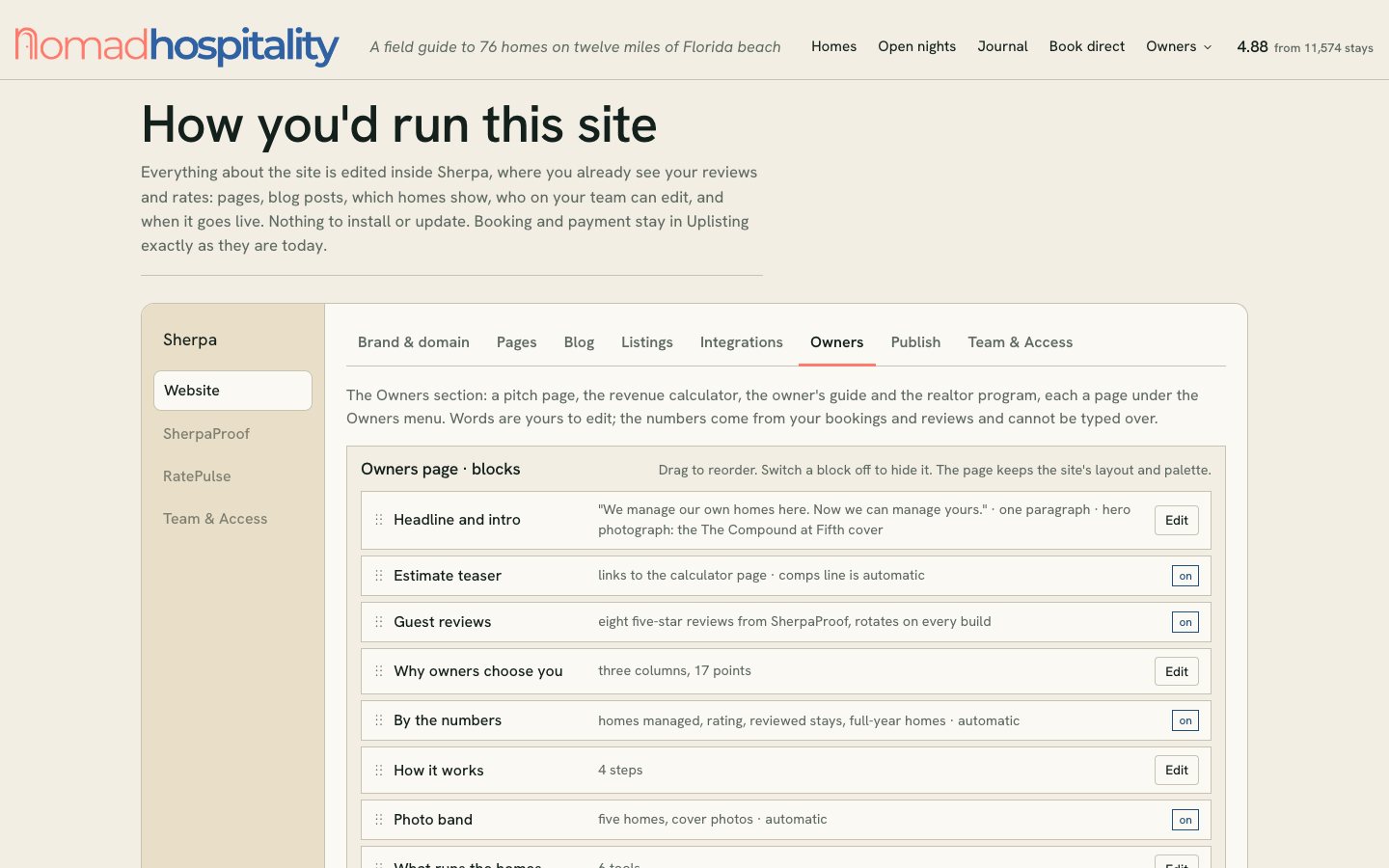
Under the Owners menu: a pitch page built from your own numbers, a revenue calculator, an owner's guide and a realtor program. The calculator runs on your own bookings by bedroom count, states its basis under every figure, and never prints a number it cannot stand behind. The full report opens behind an email, which lands as an owner lead in Sherpa, your inbox, Slack and HubSpot. Connect PriceLabs or Wheelhouse and market data blends in.
- Three scenarios, monthly curve, expense lines; buyer and realtor paths
- Realtor-branded PDF with their logo and 'prepared for'
- Performance claims are never written for you; what you claim, you type
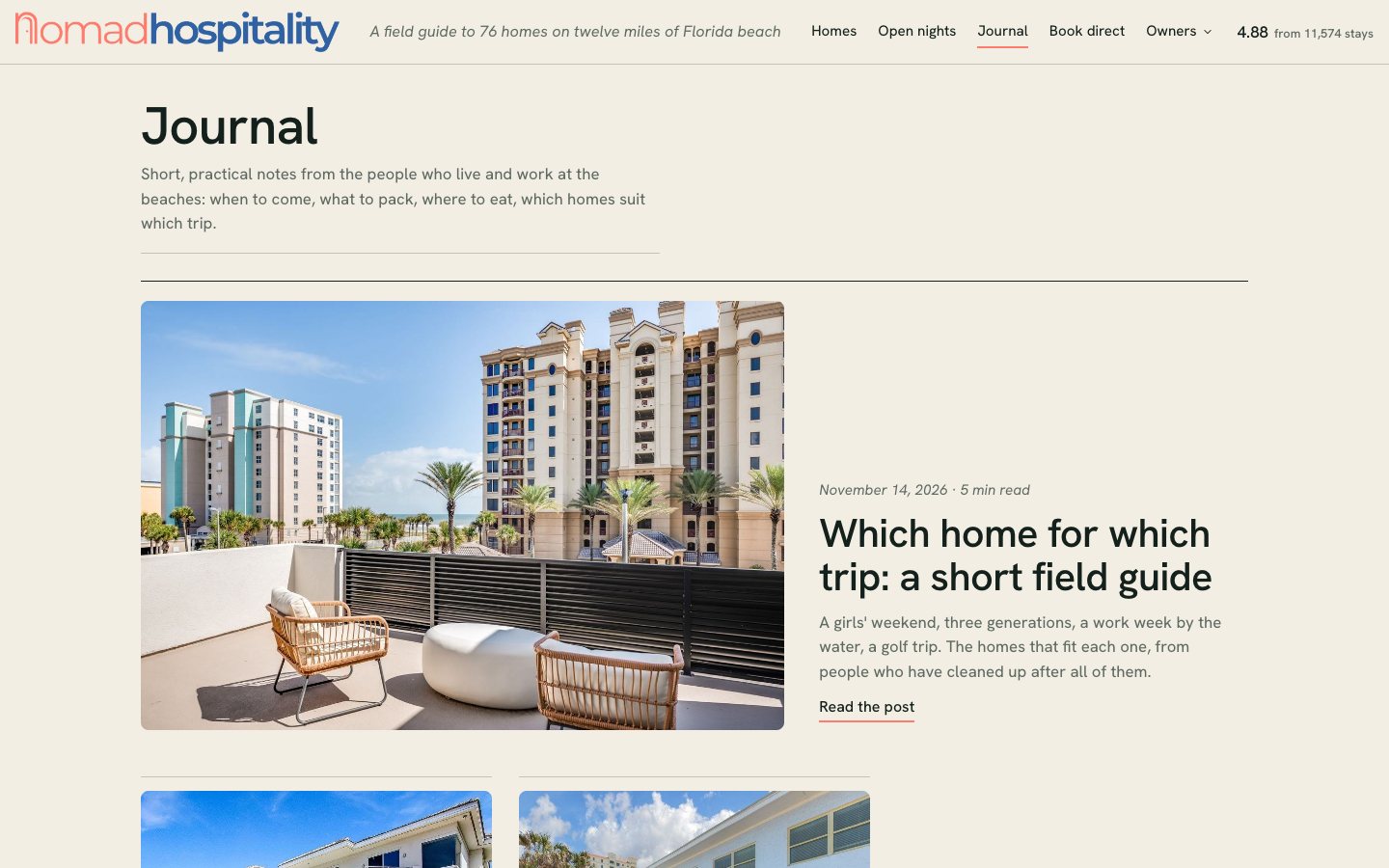
A journal worth reading
A blog that looks like your photographs, because it uses them.
Posts open with a full-bleed cover from your own homes, carry a strip of the homes that fit the trip, and link to each other. Written and published from Sherpa. It is the part of a site search engines and AI answers read most, and the part most managers leave empty.
- Featured post, grid, and a photo band of homes on the index
- Each post can carry its own cover; otherwise your best frames are used
- FAQ and review schema on the pages, for search and for AI answers
Your brand
Nine layouts, eight type-and-color sets, two pathways, your logo on all of them.
Pick a pathway: pragmatic, in the Airbnb grain, or brand, in the hotel grain. Pick a layout for how guests find a stay, a type-and-color set for how it feels, light or dark. Change any of it later without losing a page or a post. Fonts and colors are tokens, so a brand change is a save, not a redesign.
- Four pragmatic sets, four brand sets, each designed in light and dark
- No display weight heavier than a magazine would set
- The listing word is yours: cabins, homes, condos, villas
How you'd run it
Everything about the site is a screen in Sherpa. Nothing is a file.
Brand and domain, pages as blocks, journal posts, which listings show, the Owners pages, integrations by ID, publish with history and rollback, and who on your team may edit or publish. Everything the site does, from a visit to a lead, reports in SherpaFunnel. The demo includes the full walkthrough.
Pricing
Free for 30 days. Then flat bands by portfolio size.
Sherpa Sites is priced on its own, separate from the Sherpa platform subscription. The monthly price is a bundle: hosting and rebuilds, the editor and support, plus RatePulse, SherpaProof and SherpaFunnel. The launch fee covers layout and palette setup, your logo, domain and redirects, and migration from your current site.
The band and the launch fee start only if you keep the site after the trial. Month to month, cancel any time, your site exports with you. Two months free when paid annually.
Common questions
What managers ask before they switch.
How does the free trial work?
The trial is the live site, not a sandbox. We connect your PMS, build the preview from your own homes, you pick a layout and a set, and it goes live on a free subdomain or your domain. The first 30 days are free, with no card to start. Keep it and the monthly band and the launch fee start then; stop and the site comes down after a short notice, with your pages and posts exported to you.
Does Sherpa take the booking?
No. Every listing page embeds your PMS's own booking widget or links to its checkout with the dates filled in. Payment, taxes, cancellations and guest records stay where they are today. Sherpa never touches a card.
Which property managers can use it?
Uplisting and OwnerRez today, with everything the site needs: listings, photos, bookings, nightly rates, stay rules, fees and the checkout link. Hostaway, Guesty, Host Tools, Hostfully, Hospitable, Track, iGMS and Lodgify already send Sherpa their listings and bookings; for a site, each needs two small additions on our side, the nightly-rate and fee feed that prices the calendar and the format of its checkout link. We add those per PMS as managers sign up, so tell us yours.
Who hosts it, and what if I leave?
Sherpa publishes your site to Cloudflare's edge under its own account, and your domain points at it with one DNS record. Your listings live in your PMS and your pages and posts live in Sherpa. If you leave, you get a zip of the whole site and point your domain somewhere else.
Can I add things to it?
Pages and posts, yes, from Sherpa. Blocks cover most requests: FAQ, promo banners, pop-ups, galleries, area guides, forms. Third-party tools connect by ID. What you cannot do is paste code or install plugins, which is why the site stays fast and does not break.
What happens to my current site and its SEO?
We map your old listing URLs to the new ones with redirects, verify Search Console on your domain, and render your reviews into the pages so Google indexes them. The cutover is one DNS change, and the old site stays up until you make it.
Do I need SherpaProof, RatePulse and SherpaFunnel separately?
No. All three are part of Sherpa Sites. Reviews and the live price check are the reason a guest books here instead of on a listing site, and the funnel is how you know it worked, so none of them is an upsell.
Connects to
Your PMS in, your site out.
- Uplisting
- OwnerRez
- SherpaProof
- RatePulse
- PriceLabs / Wheelhouse
- HubSpot
- Cloudflare
- Google Analytics & Tag Manager
See your own homes on it before you decide. Then 30 days free.
Connect your PMS and we build a private preview on your real inventory and live calendar, every layout, in a day. Pick your look, and it goes live free for 30 days.
Waitlist
Join the waitlist — we onboard operators in small batches, and you'll hear first when a seat opens.